★ The RhinoArtisan Blog
Coming in the next RhinoArtisan update
Beyond Symmetry with RhinoArtisan’s New Curve Editor
Book a demo with our teamNovember 20, 2026 · RhinoArtisan · News
Imagine a ring with a classic band profile. You like the slope on one side, but you’d like the other to rise a little higher or taper more gently. Until now, moving a point on one side also moved its mirror image. RhinoArtisan’s new Curve Editor will be available in the next update, giving you the freedom to keep the side you love and shape the other independently.
Start with symmetry. Choose where to break it.
Draw your profile with Symmetric enabled, just as you do today. When you’re ready to explore a variation, switch it off. The mirrored half becomes a set of points you can edit independently. If you prefer the shape you’ve created on one side, you can copy it across in either direction.
Round a single corner on a signet face, give one side of a band profile a steeper slope, or draw a freeform charm. You’ll have the same control over the profiles used for prongs, rails, cutters, and cutouts. Your existing designs will keep their shape, and you can continue editing them as usual.
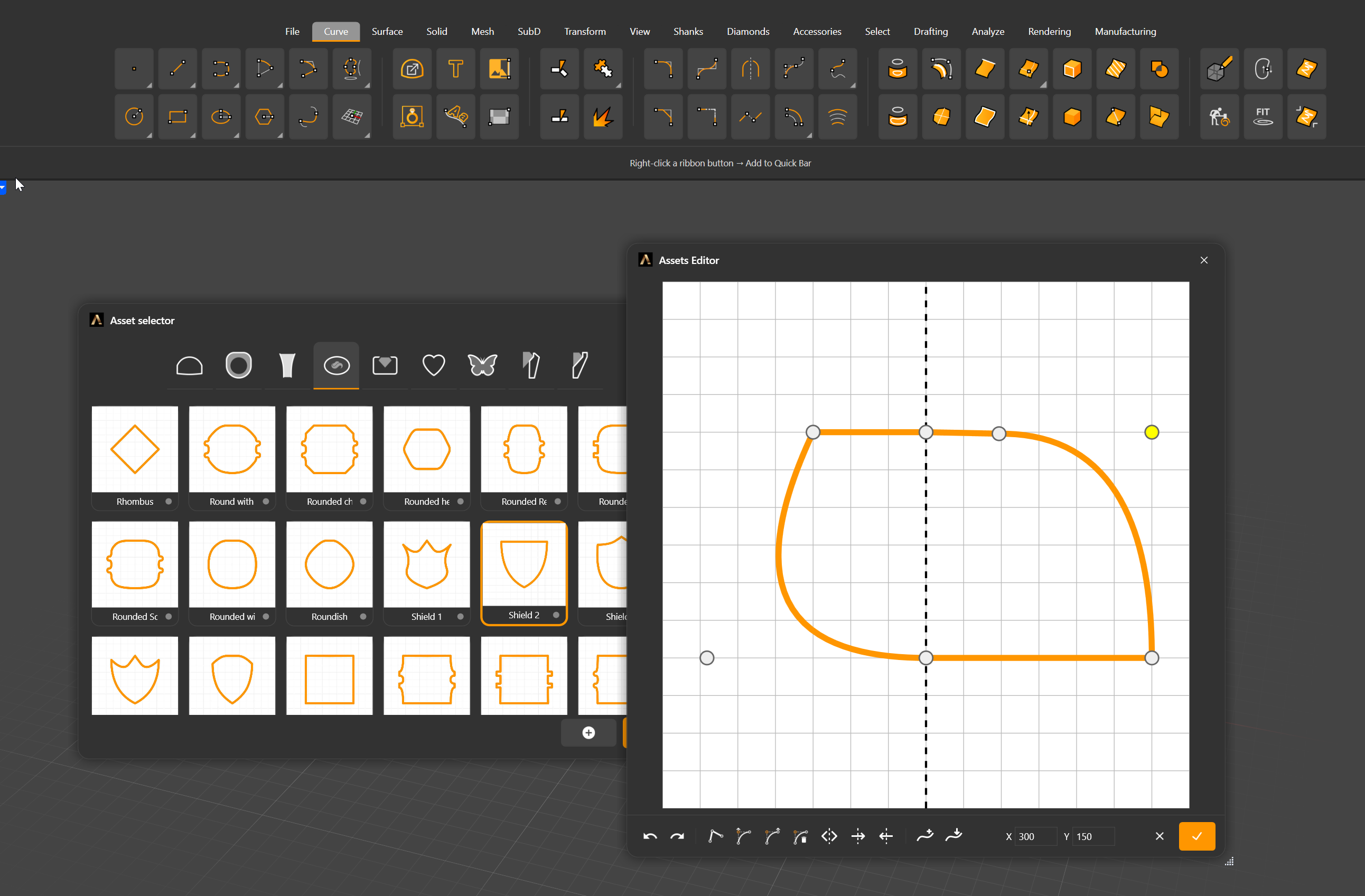
The curve you draw is the curve RhinoArtisan uses
The editor displays the exact curve RhinoArtisan uses to build your piece. As you refine the shoulder of a profile or soften a transition, you can see the line that will define the finished shape.
When you’re designing a signet face, a new guide shows its actual width-to-height ratio. You can see how far to stretch an oval or where to narrow its outline while viewing the proportions it will have on the ring.
From broad strokes to fine adjustments
To reshape an entire side, hold Ctrl and click the points you want, then drag them together. For smaller adjustments, nudge a point with the arrow keys. When you know exactly where it belongs, enter its X and Y coordinates.
A red circle highlights any point where the curve forms a sharp corner as it crosses the centerline. At the tip of a heart, that might be exactly what you want. On the rounded profile of a band, a click on Tangent smooths the transition.
When the update arrives, open one of your favorite profiles, switch off Symmetric, and try moving a point on just one side. That small change could be the starting point for your next design.
Design it. Manufacture it. Sell it.
Try RhinoArtisan free for 15 days
Full access to every tool. No credit card required. Works with your existing Rhino for Windows installation.
For Rhino on Windows · On a Mac? Join the free Mac beta →
Private consultation
Bring a real project. Leave with a plan.
Thirty minutes, one-to-one, with a RhinoArtisan specialist. We look at how you work today, show where RhinoArtisan fits in your process using your own piece, and leave you with a clear next step. For jewelry professionals and workshops.