Infinity Pendant
Lesson 29 of 62
Reference Surface with Sweep 2 Rails
Sign in to access this lesson
This lesson is part of Precision & Detail Design, which can come bundled with a RhinoArtisan Commercial license subject to current promotions. Log in with your customer account, or get in touch and we'll set you up.
Customers only
Solo para clientes
This lesson is part of Precision & Detail Design, which can be included with a RhinoArtisan Commercial license subject to current promotions. If you've already purchased and don't see it in your account, get in touch.
Objective: Learn how to build the reference surface that will orient the profile of the pendant.
Perpendicular Line
Create a perpendicular line on the left side, exactly at the height of the central axis. This line will be the section of the sweep.

Sweep 2 Rails
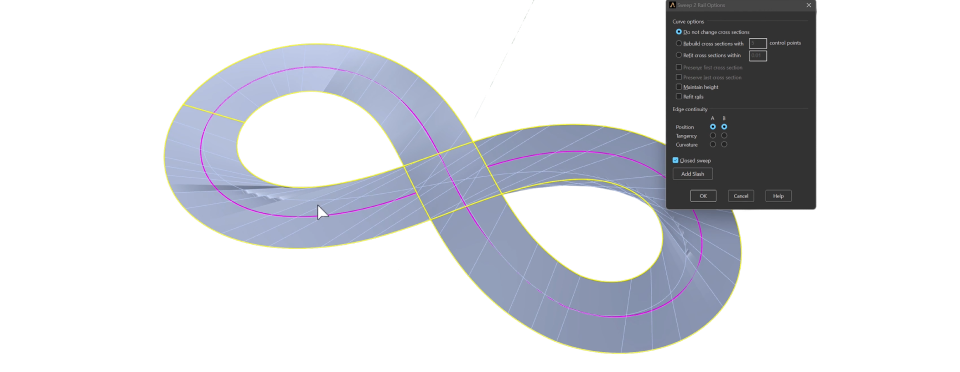
Go to the “Surface” tab and use the “Sweep 2 Rails” command.

- Select the outer curves.
- Finally select the line you created.
- Press Enter to create the surface.
Fix the Isocurves
You’ll notice the surface isocurves are not correctly aligned. In the options window, click on Add Slash and add some curves to adjust the curvature.
Once it’s to your liking:
- Activate Maintain Height.
- Activate Closed Sweep.
- Press OK to confirm the surface creation.
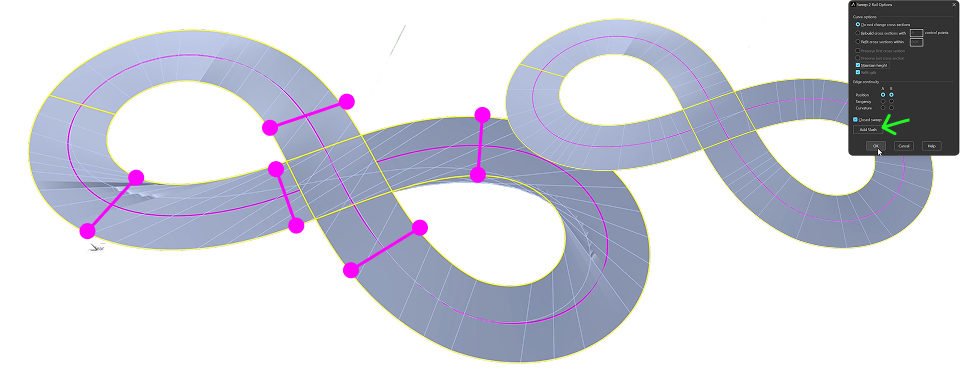
We’ll use this surface as a reference for creating the profile.
Video Lesson
Next Step
Next, we’ll rebuild the central curve and apply the main profile.
Almost there — you still have some lessons to complete. Jump to the next one →
Impersonating — progress and reviews are disabled.
Course completed
You've completed Precision & Detail Design 🎉
Great work. Get your certificate of completion and, if you have a minute, let other jewelers know what you thought of the course.