Moebius Diamond Pendant
Lesson 52 of 62
Split the Circles
Sign in to access this lesson
This lesson is part of Precision & Detail Design, which can come bundled with a RhinoArtisan Commercial license subject to current promotions. Log in with your customer account, or get in touch and we'll set you up.
Customers only
Solo para clientes
This lesson is part of Precision & Detail Design, which can be included with a RhinoArtisan Commercial license subject to current promotions. If you've already purchased and don't see it in your account, get in touch.
Objective: Learn how to cut both circles into the four arcs that build the pendant.
Vertical Line
Go to the “Curve” tab and use the “Line” command.

Activate the grid snap option and draw a vertical line crossing both circles.
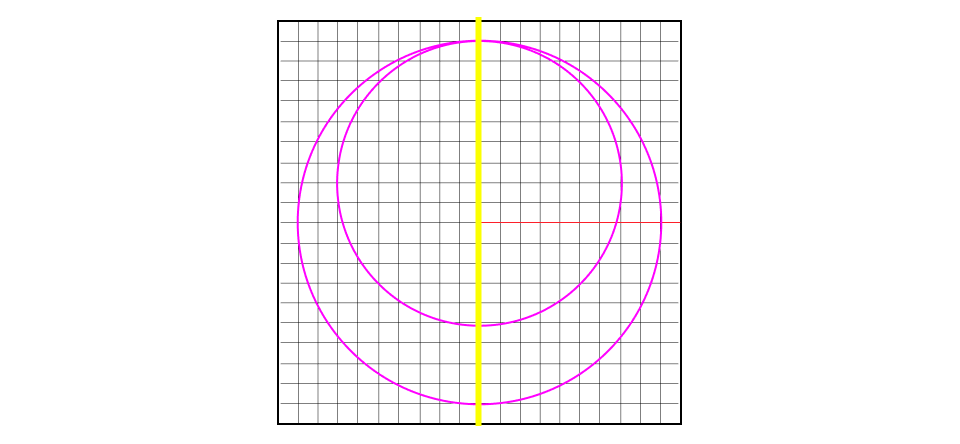
Split
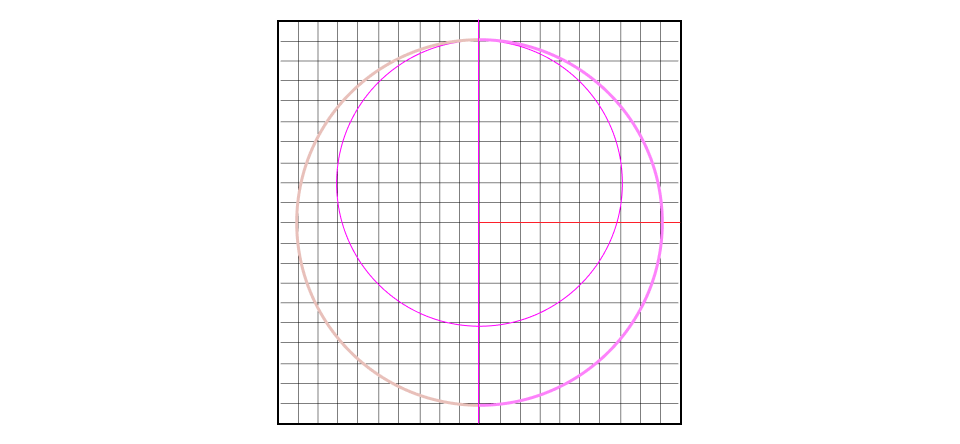
Select the circles and, in the upper left corner, use the “Split” command. Then select the line and press Enter.
You can always read the command bar for guidance on the steps required by each command.
The circles are now split in two. Changing the curve layers makes them easier to distinguish while you work, although it isn’t strictly necessary.
Video Lesson
Next Step
Next, we’ll rotate and position the arcs to give the Moebius its twist.
Almost there — you still have some lessons to complete. Jump to the next one →
Impersonating — progress and reviews are disabled.
Course completed
You've completed Precision & Detail Design 🎉
Great work. Get your certificate of completion and, if you have a minute, let other jewelers know what you thought of the course.