Commands
Fillet Edge
.png) Fillet Edge
Fillet Edge
The FilletEdge command creates a tangent surface between polysurface edges with varying radius values then trims and joins the original faces to the fillet surfaces.
Steps
-
Select edges.
Or, double-click an edge to select tangent edges.
-
Edit radius handles and options.
Command-line options
-ShowRadius
- Yes: Displays radius handles in the viewport.
- No: Hides radius handles in the viewport. A hidden radius handle will display when the mouse cursor is close to it.
-NextRadius: Specifies the radius for the next edge.
-ChainEdges: Automatically selects connected edge based on continuity.
.png)
-FaceEdges: Pick a face to select its boundary edges. Tangent edges are excluded.
.png)
-PreviousEdgeSelection: In cases where the command is canceled or ended prematurely, the PreviousEdgeSelection option re-selects the previously selected edges. Supports multiple sets of previously selected edges for up 20 previous edge sets.
-TrimAndJoin: Trims and joins the resulting surface to the input surfaces. History only works if TrimAndJoin=No
-SelectEdges: Allows selecting more edges after the selection has been closed.
-Preview: Displays a dynamic preview. You can change the options and the preview will update
-Edit: Edit the most recent selected set of edges.
-
“Tip”: When no command is running, double-clicking the object is the alternative way to start the editing mode.
-
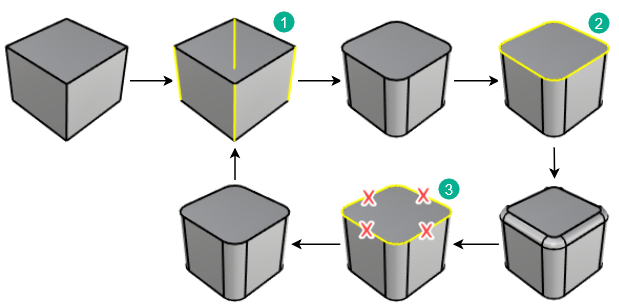
To edit edges
1.Select the object to edit. The editable edges highlight.
2.Edit the size of the handles.
3.Click the SelectEdges option.
4.Use Shift + click to add edges. Use Ctrl + click to remove edges. Remove all edges in the most recent edge set to return to the previous edge set.
Tip: Radius and Distance options appear on the command line when you drag a handle grip.
Radius/Distance options
-FromCurve: Select a curve. The radius of the curve at the picked location will be used.
-FromTwoPoints: Pick two points to show the radius distance.
Handle options
-AddHandle: Adds a handle along the edges.
-CopyHandle: Adds a new handle using the distance from the selected handle.
-RemoveHandle: Visible only when at least one handle has been added.
-SetAll: Sets the distance or radius for all handles.
-LinkHandles: Editing a single handle updates all handles
RailType options
-DistFromEdge: The distance from the edge curves determines the intersection.
-RollingBall: The radius of a rolling ball determines the intersection.
-DistBetweenRails: The distance between the edge rails determines the intersection
For more information, please refer to the Rhino documentation.