Commands
SelSubDEdges
 SelSubDEdges
The SelSubDEdges command selects different types of edges on selected SubDs.
Steps
-
Select SubD objects, press Enter.
The command reports the numbers of different edge types.
-
Sets what types of edges to be selected.
The command-line only shows the edge types that the selected SubDs have.
Command-line options
Smooth (Yes/No)
Specifies whether smooth edges will be selected.
Weighted (Yes/No)
Specifies whether soft crease edges will be selected.
The SubDCrease command adds soft crease edges to SubDs.
Crease (Yes/No)
Specifies whether hard crease edges will be selected.
The Crease command adds hard crease edges to SubDs.
Boundary (Yes/No)
Specifies whether naked edges will be selected.
The MakeSubDFriendly command makes any curves SubD compatible.
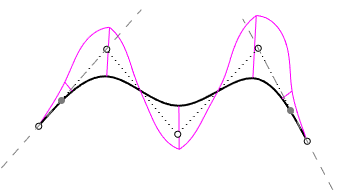
- A SubD friendly curve is a degree 3 uniform curve.
- The second control points on both ends are constrained and locked. These points display with the locked object color.
- The first and last three control points are always collinear to maintain zero curvature at both ends.
- Moving or deleting Control Points or Edit Points will not destroy the SubD friendly characteristic.
- SubD creation commands (SubDLoft, SubDSweep1, SubDSweep2…) create a better SubD object from SubD friendly curves.
For more information, please refer to the Rhino documentation.