Commands
Stitch
 Stitch
The Stitch command matches the positions of a pair of mesh/SubD vertices.
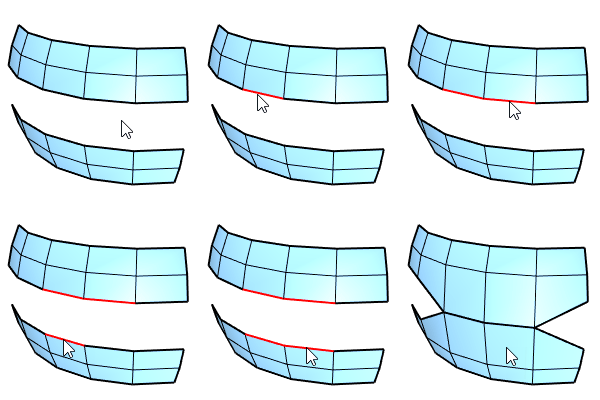
Input
- Mesh edges, vertices, control points
- SubD edges, vertices, control points
Command options
Edge selection mode
-
(Default)
Click selects a single edge. Double-click selects an edge loop.
Ctrl+click deselects a single edge. Ctrl+double-click deselects an edge loop.
-
EdgeLoop
Click an edge to select an edge loop.
The clicked edge displays a brighter highlight than the other edges in the loop.
Ctrl+click the same edge to deselect the loop.
The Edges option also allows selecting a pair of vertices.
Stitch location
-
Average
Right-click to stitch at the average location.
-
First
Stitch at the location of the first set.
-
Second
Stitch at the location of the second set.
For more information, please refer to the Rhino documentation.