RhinoArtisan for Mac is in development, and so is this documentation. Any part of it may be inaccurate or change as the product evolves.
This page was written for RhinoArtisan 7 for Windows and has not been reviewed for Mac yet. Screenshots and some details may differ in Rhino for Mac.
Recent
 Recent opens the Recent Files window.
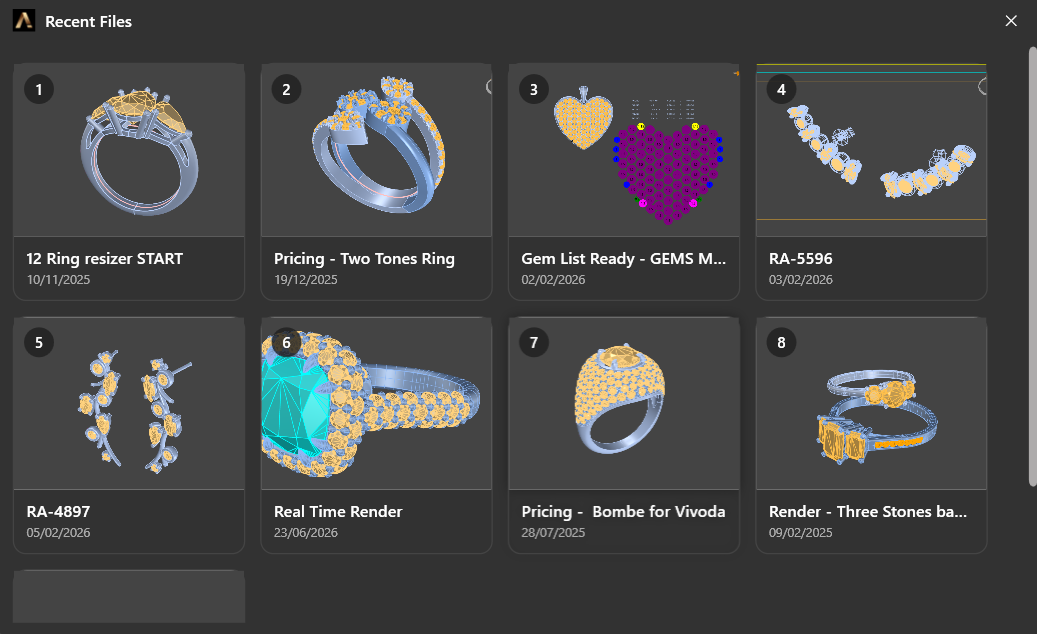
Every design is a thumbnail, so you recognise the piece before you read the name
Each entry carries a rendered thumbnail of the piece, its file name and the date it was last saved, numbered in order. Click one and it opens; if the file you are in has unsaved changes, you are asked whether to save them first.
The thumbnail is the point. A folder of files called RA-4897 and RA-5596
tells you nothing, and jewellery files are rarely named after what they look
like — here you find the ring by looking at it.
Keyboard controls
Press 1 to 8 to open the file with that number, or Return or Space to open a focused file card. Press Escape to close the window.