In development
RhinoArtisan for Mac is in development, and so is this documentation. Any part of it may be inaccurate or change as the product evolves.
User Interface
Main Toolbar
The Artisan toolbar gives you access to RhinoArtisan’s main tools and sections. The cards below follow the image: the first row from left to right, then the second row.
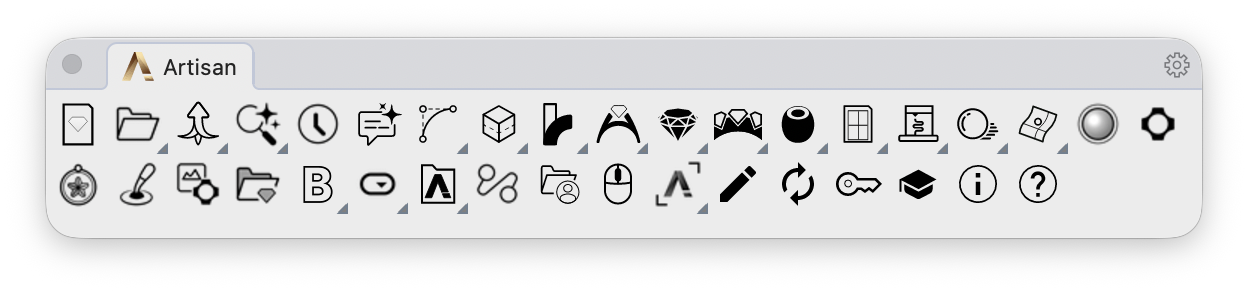
For opening linked toolbars, alternate actions and arranging the bars, see Toolbars. The two rows below match the image; the toolbar may wrap differently in your workspace.
First row
 Recent FilesOpen recent designs.
 FileFile tools, templates and project utilities.
 StandardizeOpens the Standardize toolbar.
 File SearchFind designs in your indexed folders.
 Time TrackerOpen the time tracking panel.
 AssistantOpen the jewelry design assistant.
 CurvesDraw, connect and shape curves.
 SolidsBuild and refine solid geometry.
 TransformMove, orient and transform your designs.
 ShanksCreate and edit ring shanks.
 Diamonds and GemstonesCreate, arrange and adjust gemstones.
 GemsetsSettings, trilogy mounts, cutters and prongs.
 AccessoriesFindings, decorative details and reusable elements.
 DraftingDimensions, gem lists and technical documents.
 3D PrintingPrepare designs for manufacturing.
 RenderingMaterials, lighting, images and animations.
 AnalyzeInspect geometry, dimensions and weight.
 Realtime RenderOpen the realtime render window.
 Generative AIOpen the generative AI studio.
Second row
 ReliefCreate relief geometry from an image.
 SculptOpen the sculpting tools.
 AI Depth MapOpen the depth map window with ArtisanAIDepthMap.
 Import ElementsImport an elements file. Right-click to export elements by type.
 RetailCollections, components and the design library.
 ConfiguratorsPrepare variants and GLB files for configurators.
 PanelsOpen Outliner, Layers and other Artisan panels.
 Flow StudioOpen Flow Studio AI.
 Open User FolderOpen your RhinoArtisan files in Finder. Right-click to reset the user folder.
 SelectSelect Artisan elements by type: gems, settings, shanks and more.
 EditSelect supported Artisan objects to open their editor.
 UpdateCheck for RhinoArtisan updates.
 LicenseOpen your Mac license and seat controls.
 LearnOpen learning resources.
 AboutArtisanAbout shows version information. Return or Escape closes it.
 HelpBrowse the RhinoArtisan for Mac documentation.