Diamonds and Gemstones
Gems on 2 Curves
 Gems on 2 Curves
With this command, you can parametrically generate gems between two curves. This is especially useful when filling spaces with gems on organic designs and other complex pieces: the size of each gemstone is automatically determined by the distance between the curves, so the distribution adapts itself to the shape you drew.
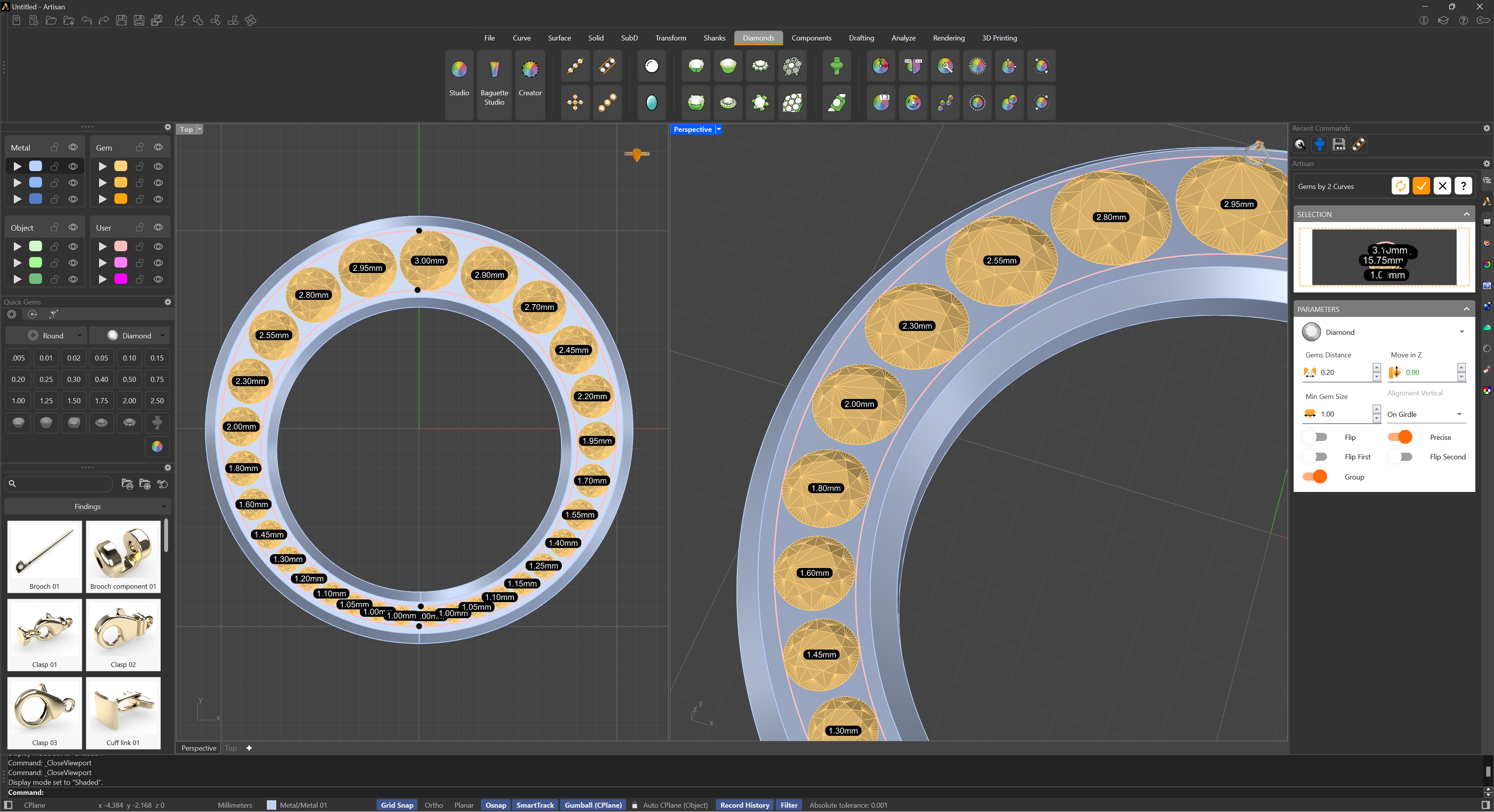
Selection
Start by selecting the two curves that define the path and the width available for the stones. Unlike other gem placement commands where you define the number and size of the stones, here both are computed automatically so the gemstones fit perfectly within the space provided.
Four handles appear on the curves — one at each end of each curve. Drag them to limit the stretch of the curves used for the distribution, without trimming or editing the original geometry. The panel also reports the distance between the first and last stone, which is very handy when the run must stop at an exact point of the shank.
The Parameters section is divided into three tabs: Gems, Prongs and Cutters.
 Gems
Gems
- Material: The gemstone material, from Diamond (white or Champagne) to the colored varieties of Sapphire, Topaz, Tourmaline, Quartz and more. The stones are round brilliants, sized automatically to the space between the curves.
- Algorithm: Choose how the stones are distributed: By spine curve places them along the middle line between the two curves, while By tangency packs each stone tangent to the previous one — the right choice when consecutive stones must touch.
- Gems Distance: The spacing between consecutive gemstones.
- Min. Size: The minimum gem diameter. Where the curves get too close together for a stone of this size, no stone is placed — use it to avoid dust-sized gems at the tapered ends.
- Move in Z: Fine-tune the vertical position of the stones relative to the curves.
- Alignment Vertical: Align the gems by their Top (table) or by their Girdle.
- Flip / Flip First / Flip Second: If the stones come out on the wrong side or the distribution looks twisted, these switches reverse the orientation of the result or the direction of either curve.
- Precise: Rebuilds the curves internally for a more accurate distribution on complex or unevenly parameterized curves.
- Group: Groups the generated stones into a single object when the command is confirmed.
The Info section shows the resulting stone count and the total carat weight, updated live as you adjust the parameters — your gem report before you even confirm.
 Prongs
- Show Prongs: Enable this selector to generate prongs for the run.
- Prong Distribution: Choose Shared Prongs (two prongs between consecutive stones, shared by both) for a streamlined look, or Individual Prongs (four prongs per stone) for more secure support. Each prong displays its diameter in the viewport, and gumballs let you fine-tune positions directly on the model.
- Diameter: The thickness of the prongs.
- Distance: The separation between the two shared prongs.
- Height over girdle / Height under girdle: How far the prongs rise above and extend below the girdle of each stone.
- Extension manufacturing: Adds extra length to the prongs when the piece is switched to Manufacturing mode, giving the setter material to work with.
- End Prong Mode: Single or double prongs for the first and last stones of the run.
 Cutters
- Show Cutters: Enable this selector to generate a cutter under each gemstone — the volume used to open the seat and drill hole in the metal.
- Type: The cutter profile: Gemstone Shape, Round, Square or Hexagon.
- Heights (as a percentage of each gem): Height Top, Height Crown, Height Girdle, Height Pavilion and Height Drill control each section of the cutter, from the volume above the stone down to the drill hole.
- Sizes (as a percentage of each gem): Size Top, Size Bottom and Size Drill control the width of the cutter at each level.
- Gem Inside: How deep the gemstone sits inside the metal, in millimeters.
Because the cutters are sized per stone, the graduated run keeps correct seats from the largest gem to the smallest one.