User Interface
Default Settings
New in RhinoArtisan 7 — and one of the features our users have asked for the most.
When you enter a command, RhinoArtisan loads its default values. They’re good starting points, but by definition they’re generic — and your workshop isn’t. Say the default prong size is 1.5 mm and in your designs it’s always 2 mm: until now, you changed it by hand every single time you opened the command.
Not any more. Now you can save your own defaults, command by command:
- Open the command and set the parameters exactly the way you like them.
- Click the gear icon in the command header.
- Choose Save as default.
That’s it. From now on, that command opens with your values — every time.
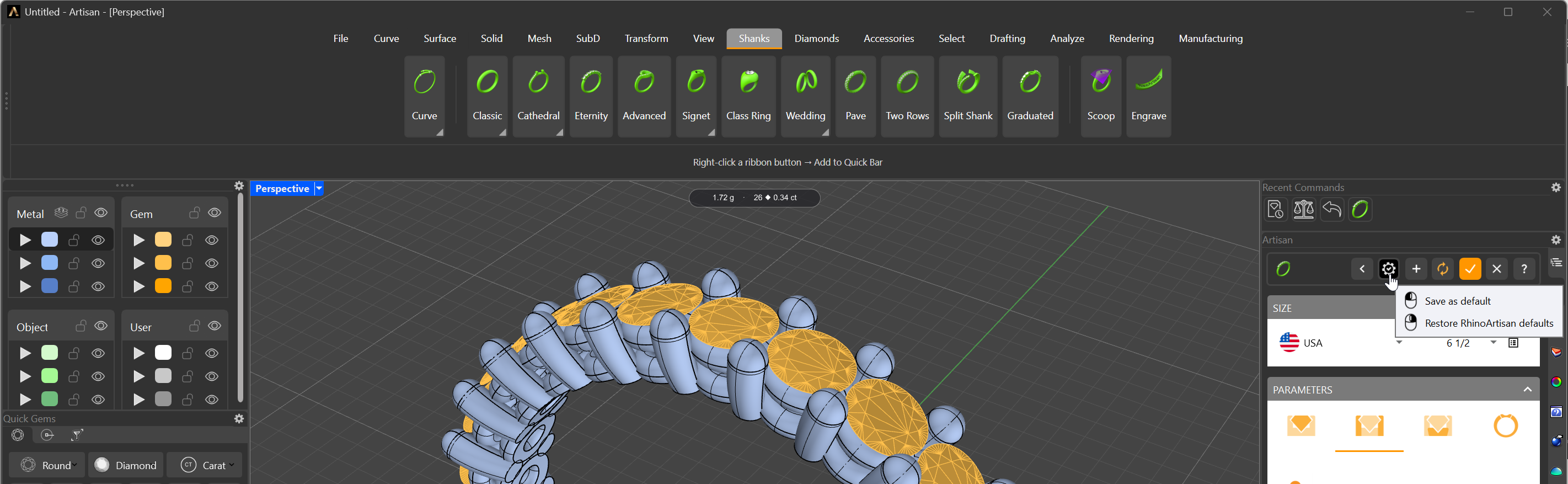
Save as default — from now on, this command opens with your values
Why you’ll love it
- You stop repeating yourself. The adjustments you made on every single command run are now made once — and kept. Multiply the seconds saved by every command, every piece, every day.
- RhinoArtisan becomes your software. Your prong sizes, your distances, your expansions — every tool opens speaking your workshop’s language, not a generic one.