Organic Modeling & Sculpting
Radiate
 Radiate
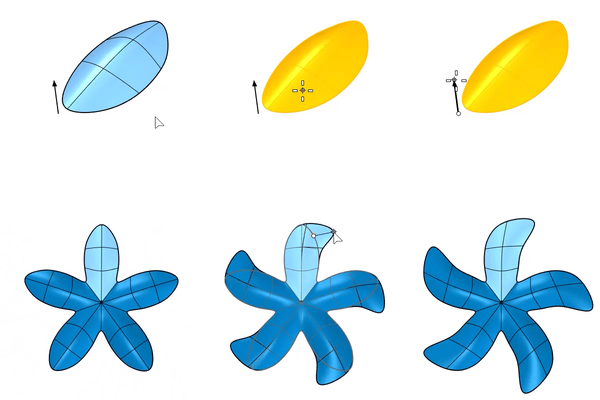
The Radiate command creates a radial-symmetrical SubD with specified segments. Editing of one segment applies to all the others.
Steps
-
Select a SubD.
-
Enter the segment number.
-
Pick a point for the radial center.
Press Enter to use the current CPlane origin.
-
Edit any one of the segments.
Command-line options
RemoveExistingReflectSymmetry
Unlinks both sides of a Reflect SubD before creating the new symmetry.
UseLastAxis
Uses the previous axis to create the radial symmetry.
Axis
Pick two points to define the radial center and axis direction.
-
Basepoint
Pick two points on existing objects as the reference of axis direction.
For more information, please refer to the Rhino documentation.