Pricing
How to Set Your Prices
 Breakdown Settings
Breakdown Settings is where your workshop’s real numbers live: what you pay for metal, what you charge for printing, casting, finishing and setting, and how long each step takes. Everything the Breakdown Details panel, the Technical Chart and the Report show is calculated from this dialog — set it once, correctly, and the rest of RhinoArtisan prices your work on its own.
Open it from Manufacturing → Breakdown Settings, or run
ArtisanBreakdownSettings. The window title shows when the settings were last
updated, a useful reminder when metal has moved since you filled them in.
The eight icons across the top are the eight tabs, and the buttons along the bottom are the same everywhere:
- Set Default Values — restores the factory numbers, a clean starting point.
- Validate Values — checks the settings for gaps and inconsistencies before you rely on them.
- ? — opens this page.
- ✕ / ✓ — discard or save.
 Info
Info
Who the breakdown belongs to. The name, location and currency you set here head every report and drive how prices are displayed.
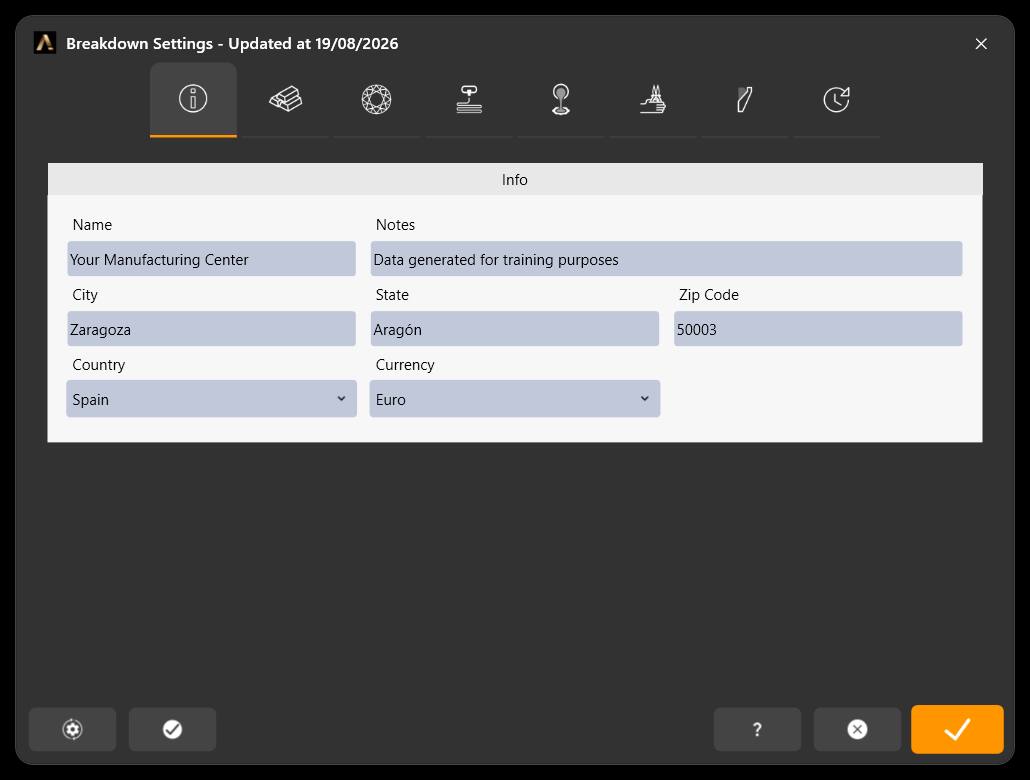
Info: company details and the currency used across the breakdown
- Name and Notes — the manufacturing centre this configuration belongs to, and any internal remark about it.
- City, State, Zip Code, Country.
- Currency — the currency every price in RhinoArtisan is expressed in.
 Metals
The tab with the shortest shelf life — metal moves every day.
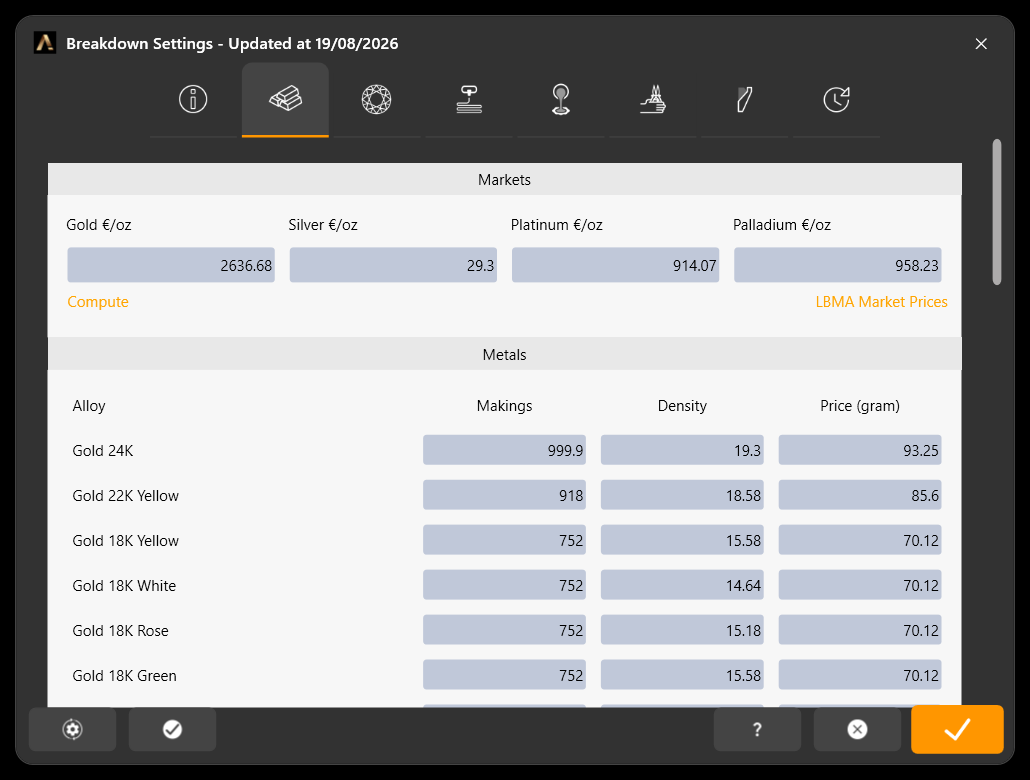
Markets and the alloy table, with makings, density and price per gram
Markets takes the reference price for gold, silver, platinum and palladium, and says how to read it:
- Market currency and Unit — the currency and unit the four prices are
typed in: LBMA quotes in USD per troy ounce, an Indian bullion dealer in ₹ per
gram. The labels follow your choice (
$/oz,₹/g…). - Exchange rate — how many units of your company currency (Info tab) one unit of the market currency is worth. Leave it at 1 when both are the same.
- Duty / Levy (%) — import duty or levy added on top of the market price, one percentage per metal because they usually differ. Empty or 0 adds nothing.
Under each metal the panel shows the effective price: your currency per gram with the exchange rate and the duty applied. That is the number Compute multiplies by the makings to fill the price per gram of every alloy below. The LBMA Market Prices link opens the London Bullion Market Association’s official quotations so you can copy today’s numbers.
The duty is remembered per alloy, so a breakdown marked Export (no duty) in the Breakdown panel’s Metals section costs the metal without it, while a Domestic one keeps it — same market price, two costs.
Metals is the alloy table itself, one row per alloy — 24K, 22K yellow, 18K yellow, white, rose and green, and down through the list:
- Makings — the alloy in parts per thousand. 18K is nominally 750, but if your workshop alloys at 752 to be safe above the hallmark, that is the number to put here.
- Density — used to turn the volume of the model into weight.
- Price (gram) — computed from the market quotation, and editable if you buy at a different price.
Further down the tab you can also declare the material loss expected during manufacturing, and the palladium content of your 14K and 18K white alloys, so the cost reflects the formula you actually use.
 Diamonds
What you pay for melee, per shape and per quality.
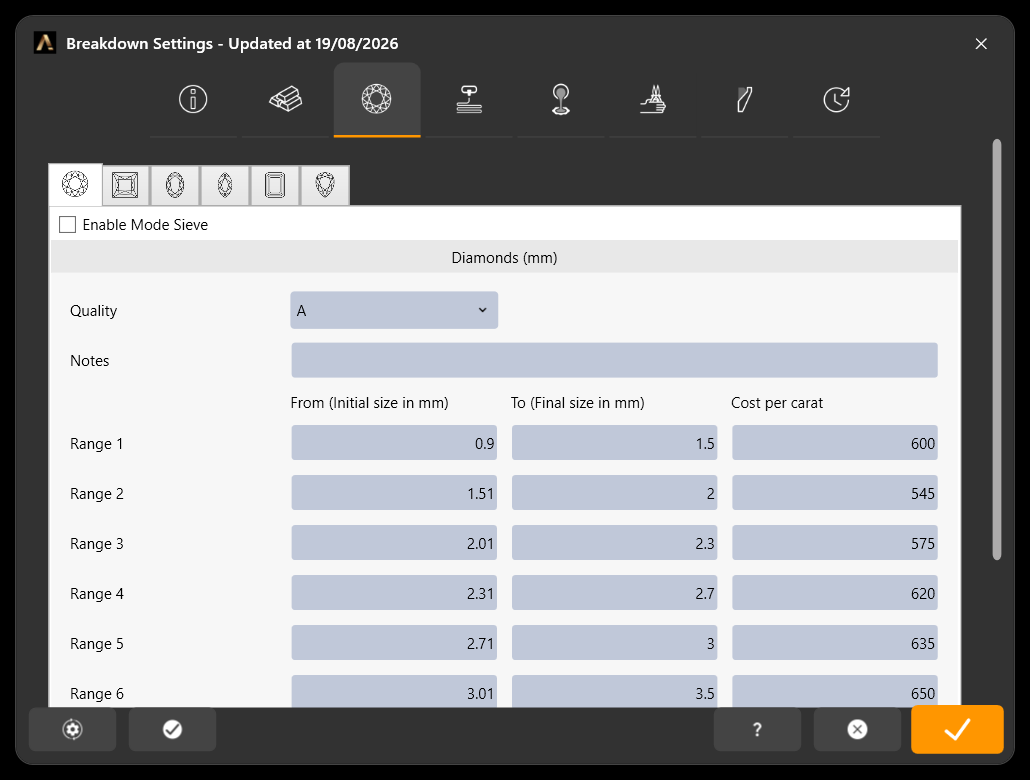
Six price ranges, set independently for each stone shape
The row of small icons under the tab bar selects the shape — round, princess, oval, pear, emerald and marquise — and each one keeps its own price table, because a 2 mm princess and a 2 mm round are not the same money.
For the selected shape:
- Enable Mode Sieve — switch the ranges from millimetres to standard sieve sizes, if that is how your supplier sells.
- Quality — the melee quality this table prices. Keep one table per quality you buy and RhinoArtisan applies the right one to the stones in the design.
- Notes — a free field for the supplier, the certificate or whatever you need to remember about this price list.
- Range 1 to Range 6 — a From and To size and the Cost per carat that applies between them.
Any stone in the design that falls inside a range is priced at that cost per carat, against its own weight. Sizes outside every range are not priced, so make sure the ranges cover what you actually set.
.png) Printing
Printing
What it costs to grow the piece in wax or resin.
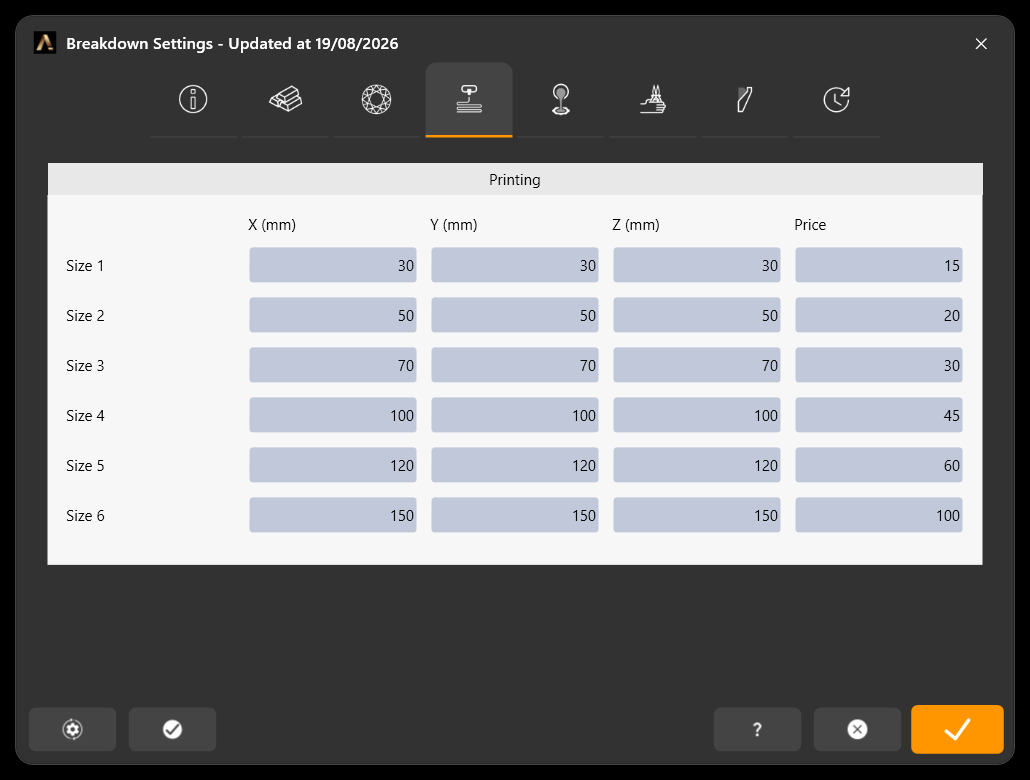
Six size brackets, priced by the bounding box of the design
Six brackets, each defined by a maximum X, Y and Z in millimetres and a Price. RhinoArtisan measures the design’s bounding box and charges the first bracket it fits into — the way a bureau quotes by build volume.
Order the brackets from smallest to largest, and make the last one big enough to catch anything you print, or oversized pieces come through unpriced.
 Casting, Finishing and Polishing (CFP)
Workshop labour: casting the piece and everything that happens after it comes out of the flask — filing, pre-polish, polish.
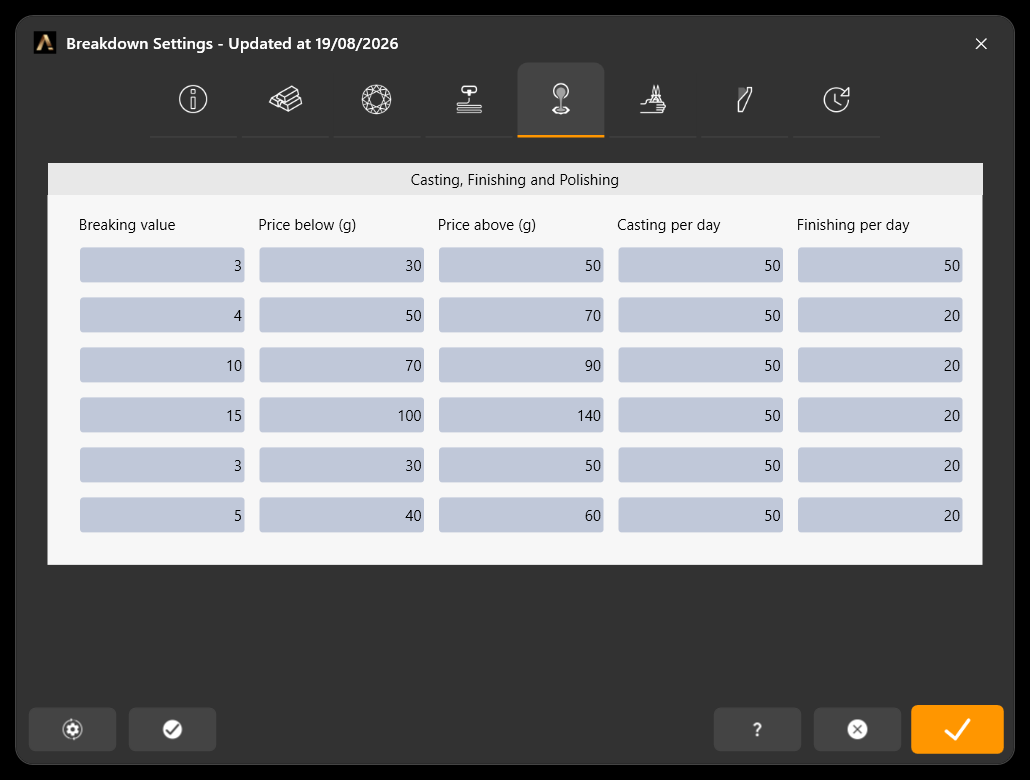
CFP prices by weight, with the daily capacity of each process
One row per type of piece, and for each:
- Breaking value — the weight in grams that separates a light piece from a heavy one.
- Price below (g) / Price above (g) — what you charge on each side of that threshold.
- Casting per day / Finishing per day — how many pieces the workshop can cast and finish in a day. These feed the delivery estimate, not the price.
 Additional Processes
The finishes that are quoted separately.
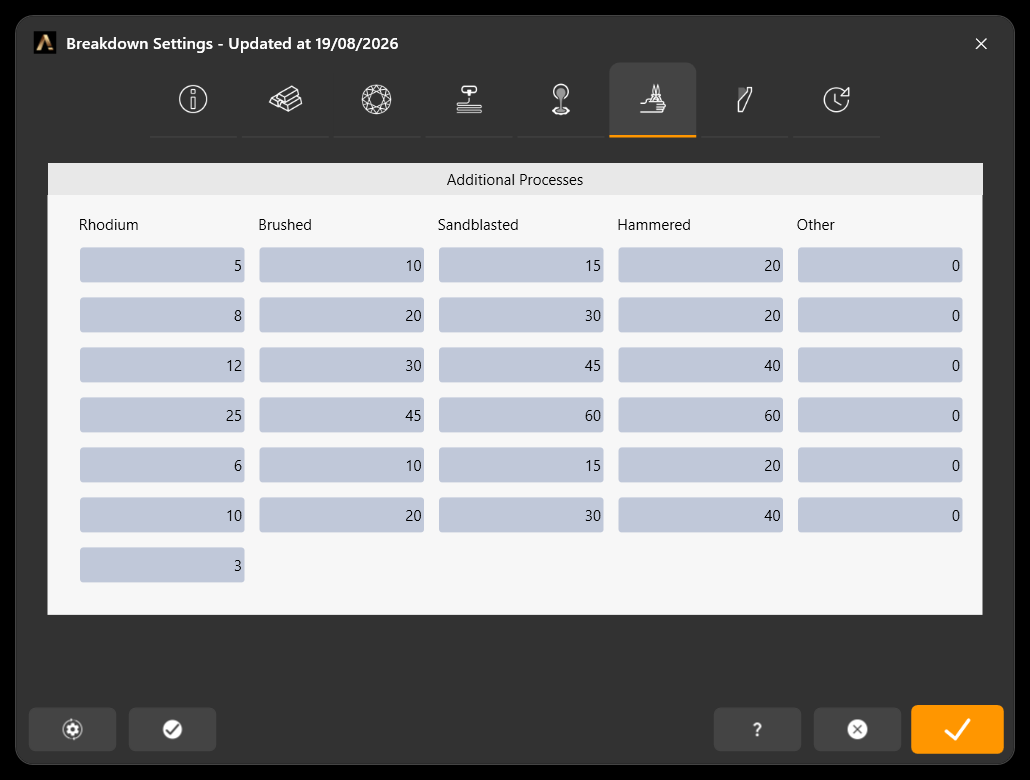
One column per finish, one row per type of piece
The columns are the processes — Rhodium, Brushed, Sandblasted, Hammered and Other for anything of your own — and the rows are the types of piece: rings, earrings, bracelets, necklaces, pendants and other.
Fill in what each finish costs on each type of piece. A rhodium bath on a ring and on a necklace are different jobs, and the breakdown prices them as such. Leave a cell at zero and the process is simply free in the breakdown.
 Gem Settings
Setting labour, by setting type and stone size.
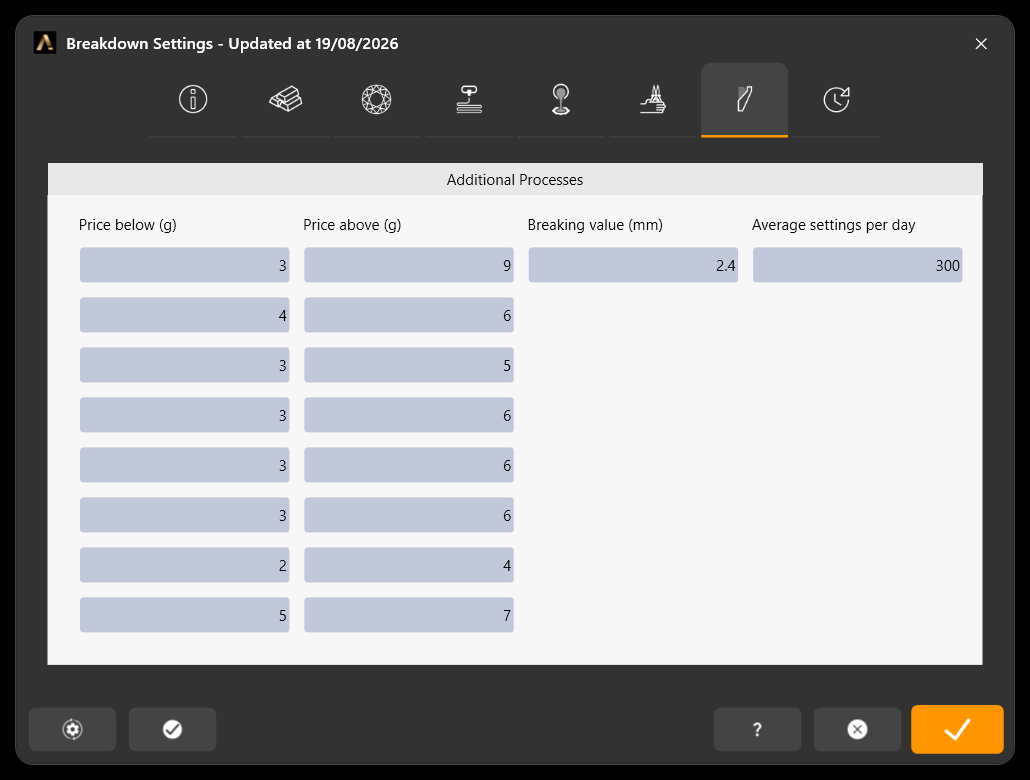
Eight setting types, each with a breaking size and a price on each side of it
One row per setting type, in this order: prong, pavé, channel, flush, bezel, pressure, wax setting and other. For each:
- Breaking value (mm) — the stone size that separates cheap from expensive work.
- Price below / Price above — the labour charged on each side of it. Setting a 1 mm stone and a 4 mm stone are different jobs.
- Average settings per day — how many stones a setter gets through in a day, which feeds the delivery estimate.
RhinoArtisan already knows which setting each stone in the design belongs to, so these numbers price the piece with no extra input from you.
 Timing
How long the work takes, so RhinoArtisan can commit to a delivery date.
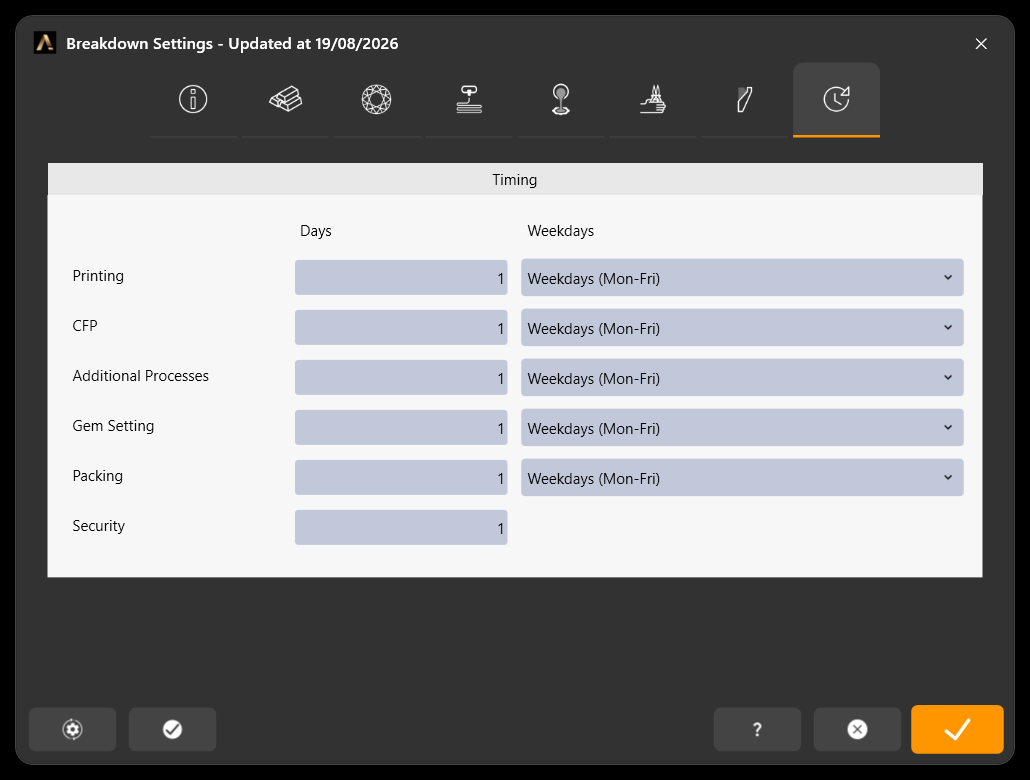
Days and working calendar for each stage of production
One row per stage — Printing, CFP, Additional Processes, Gem Setting, Packing and Security (the buffer you add for peace of mind) — and for each:
- Days — how many days that stage takes.
- Weekdays — the days it is actually carried out, so a stage that only runs Monday to Friday does not silently finish on a Sunday.
Together with the daily capacities from the CFP and Gem Settings tabs, this turns a design into a realistic delivery date instead of an optimistic one.